Browsing is open to everyone. Importing needs a connected Fulfill Engine account,
and connecting one requires a Full or Enterprise license.
Finding a product
Filter by Provider, Brand or Printing method. The printing method filter is the useful one: it narrows to products that can be produced the way you intend, whether that is DTG, DTF, embroidery, dye sublimation, engraving or UV. Each card shows its Fulfill Engine product ID, brand, price range, available colors and size range.Importing one
Open a product to see its available printing methods, all its colors and sizes, and the full specification. Choose the colors you want, or Select all. Sizes start out all selected, so deselect any you do not want. Then Import as blank opens the import form.Import as blank only opens that form once your
Fulfill Engine account is
connected. Without it you get a Fulfill Engine integration required dialog
instead.
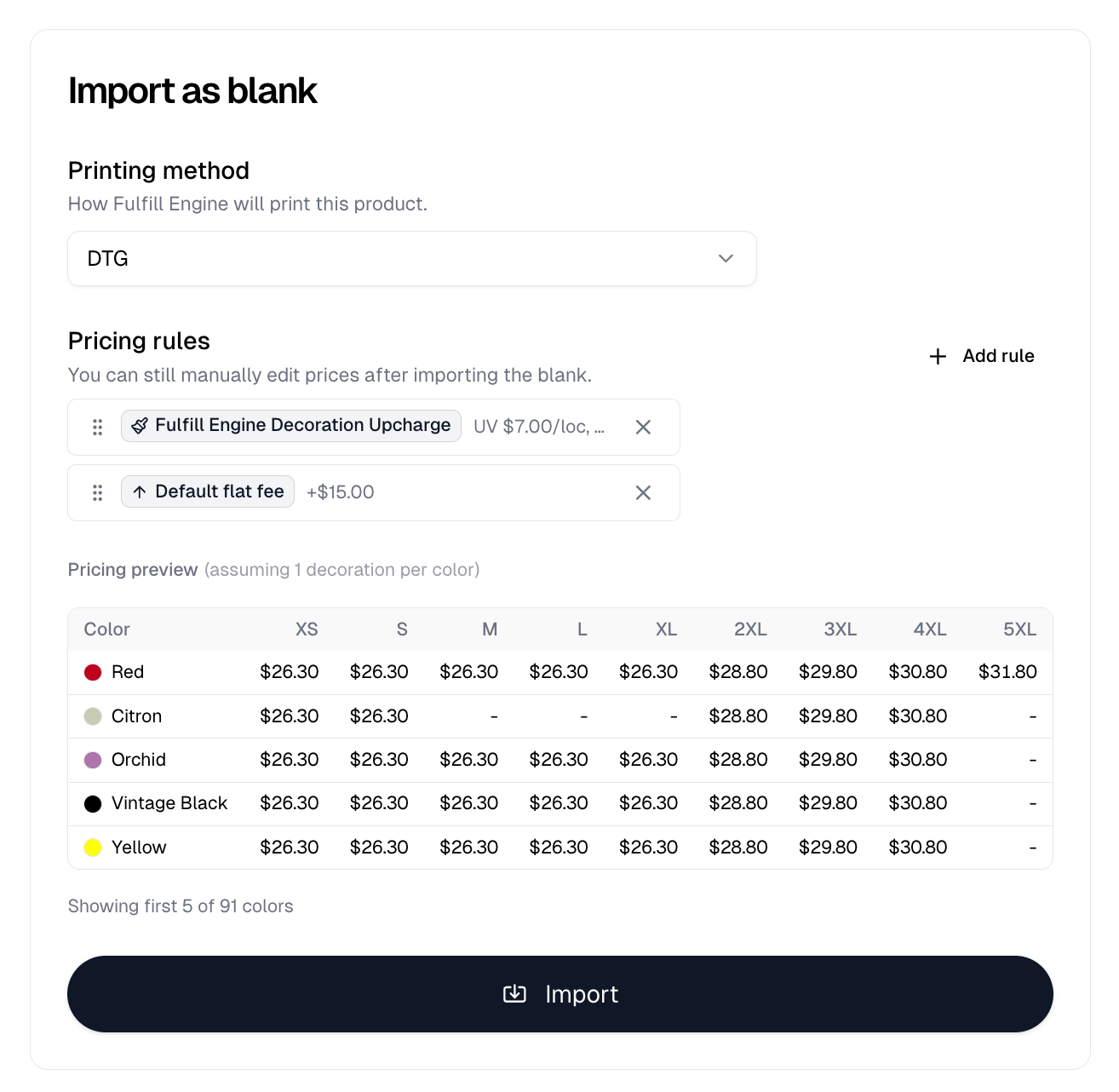
Pick a pricing rule and a Pricing preview appears below it, showing the
resulting price for your selected sizes across the first 5 of your selected
colors. It names the assumptions it priced on, such as one decoration per color
or one embroidery location at 8,000 stitches, and a dash means that color does
not come in that size. Where a rule has quantity breakpoints, you get one grid
per tier.
Import then imports it.