A quote is a pricing document a customer pays. A proposal
comes earlier and is for design review, before pricing is set.
Building a quote
New quote needs a Contact, a Title, and at least one product line. A
due date and notes are optional, and you are assigned to it by default.
Line items
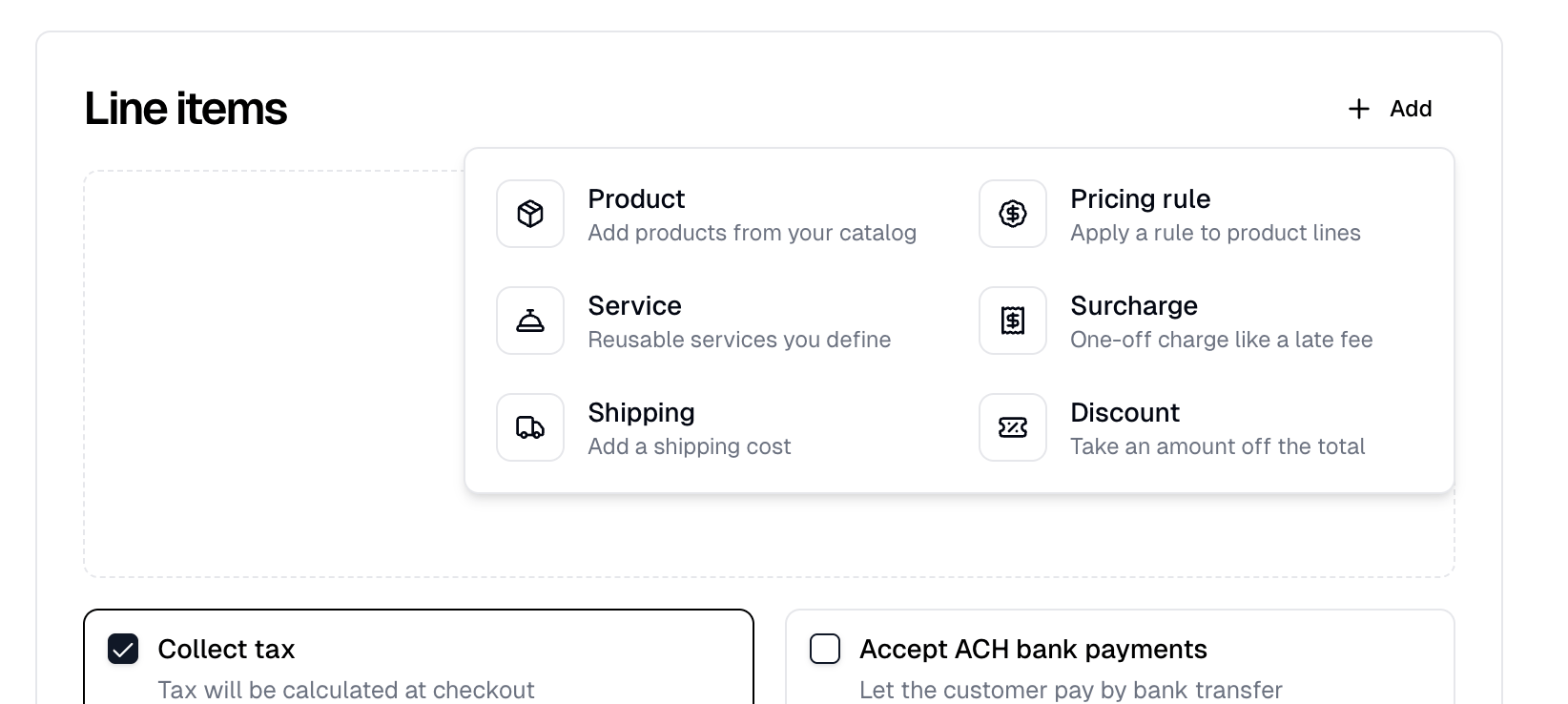
Add offers six kinds of line:
A product’s lines sit together, one row per color and size. Change a row’s
color or size in place, or add another with Add variant. Every line has a
quantity and a price you can edit, so the quote is never locked to catalog
pricing.
Adding a shipping line opens Calculate shipping, and Get rates on the
line opens it again. Confirm the package and weight, then select Get rates.
Pick a rate and select Use rate to fill in the line’s name and price.
A product line is priced when you add it, from its pricing rules at the
product’s total quantity on the quote. Changing a quantity does not reprice it.
Reprice, in a row’s ⋮ menu, prices the product’s lines again. The same
menu holds Preview, Edit design and Remove line.
Adding products
Choose from Blanks or Products, then pick quantities in a grid
of colors against sizes. A discontinued blank cannot be picked at all. Adding a
color and size already on the quote adds to that row’s quantity.
Where the supplier publishes stock it is shown under each quantity, and sizes
the supplier is out of are disabled. Everything else can be oversold, since your
own inventory never caps a quote.
Decorating a blank
Adding a blank opens the Decoration tool, limited to the colors you added.
Save design swaps the blank’s lines for a decorated product and reprices
them from it. Skip leaves them as the blank.
A Fulfill Engine blank cannot be quoted undecorated. Its lines are held back
until you save a design, and Cancel discards them.
⋮ menu, reopens the tool on that
line’s product. Saving changes the product everywhere it is used and reprices
its lines on the quote.
The Apply artwork dialog opens when you add artwork with Add › Artwork
under Attachments while a blank is on the quote. Selecting an artwork
already listed there reopens it for
the products the quote already holds.
Applying a pricing rule
Pricing rule asks which rule and which products to apply it to, so a volume
discount can cover every product on the quote or only some.
Each product is listed with how many lines it covers and the rules already on
it, so you can see what you are stacking onto.
Tax
Collect tax, the last row of the line items, is on by default. Tax is
calculated when you send the quote and again each time you save it, so the
customer sees it before paying.
A quote needs a Ship to address when it ships, either through a shipping
line or a Fulfill Engine product, or when it collects tax. Without one the quote
will not save. A ship-to you pick on a new quote is saved to the contact.
Sending it
The footer offers Save as draft and Create quote. Save as draft saves
the quote without sending anything. Send it later with Send quote on the
quote itself, which offers the same payment request as Create quote.
Create quote opens a dialog with Send quote to customer checked. Beneath
it, Request card payment for full amount or Request ACH payment for full
amount sends a payment request with the quote. Checking one clears the other,
and both show only while Send quote to customer is checked. The dialog remembers
your choices for the next quote.
The ACH option is offered to businesses in the United States.
After sending
A quote has two tabs, Details and Line items.
Copy quote link copies the link to the customer’s page: the items, any
attachments, a downloadable summary, and Make a payment.
New payment request opens a menu offering Card, Bank transfer, and
Cash or check. Card and Bank transfer send the payer a payment request.
Cash or check records one you already took. This is how you take a deposit and
the balance separately. The button is there while the quote is sent or
partially paid, and greys out when nothing is left to pay. Bank transfer is
offered to businesses in the United States.
A sent quote with no request yet carries a No payment requests badge, and its
Payment requests card links New payment request as well. On a draft, the
request sends the quote with it.
A quote that came from a buy now pay later store
carries the store’s badge and a Billing contact field in the Details card.
Payment requests go to that contact; leave it blank to bill the customer.
Payments
The Payment requests card lists each payment with its method and status.
Opening one
shows the total, your revenue, the fees, and the net you keep. A paid payment
can be refunded there with Refund, and a request nobody has paid yet can be
removed with Delete.
A request sent before you lowered the quote’s total still charges its full
amount. Refund the difference from that payment.
Converting to an order
Convert to order turns the quote into an order you can
fulfill. It does not wait for payment. The order is marked awaiting payment and
can be worked on right away. The button appears once the quote is sent, stays
until the quote has an order, and never shows on a cancelled quote.
If the quote contains Fulfill Engine products, converting submits them to
Fulfill Engine for production immediately. Itemstores warns you before it
does.
The list
Show stats for sets the window for four cards: Draft, Open,
Total value and Paid. Cancelled quotes are not counted. Filter by All, Draft, Open,
Overdue or Cancelled. Assigned joins them once a quote is assigned
to you.
Source names the proposal or store a quote came from. Billed to shows
when any quote on the page is billed to someone other than its contact.
Selecting rows hides the filters and reveals a toolbar with Request payment
and Cancel, or Reopen when you are on the Cancelled tab. Change
billing contact joins them when a pay-later quote is selected.
Request payment sends each selected quote one request for whatever it still
owes, by card or, with Request ACH payment instead of card checked, by bank
transfer. Quotes already paid in full are skipped, and the dialog lists them
before you send.
Each row links a quote to the proposal or store it came from and the order it
became, so you can follow one job across all of them.