> ## Documentation Index
> Fetch the complete documentation index at: https://itemstores.com/help/llms.txt
> Use this file to discover all available pages before exploring further.
# Coupons
> Discounts customers can use on a store
Coupons belong to one store. Open the store, go to its Coupons page, and select
**New coupon**.
## Building a coupon
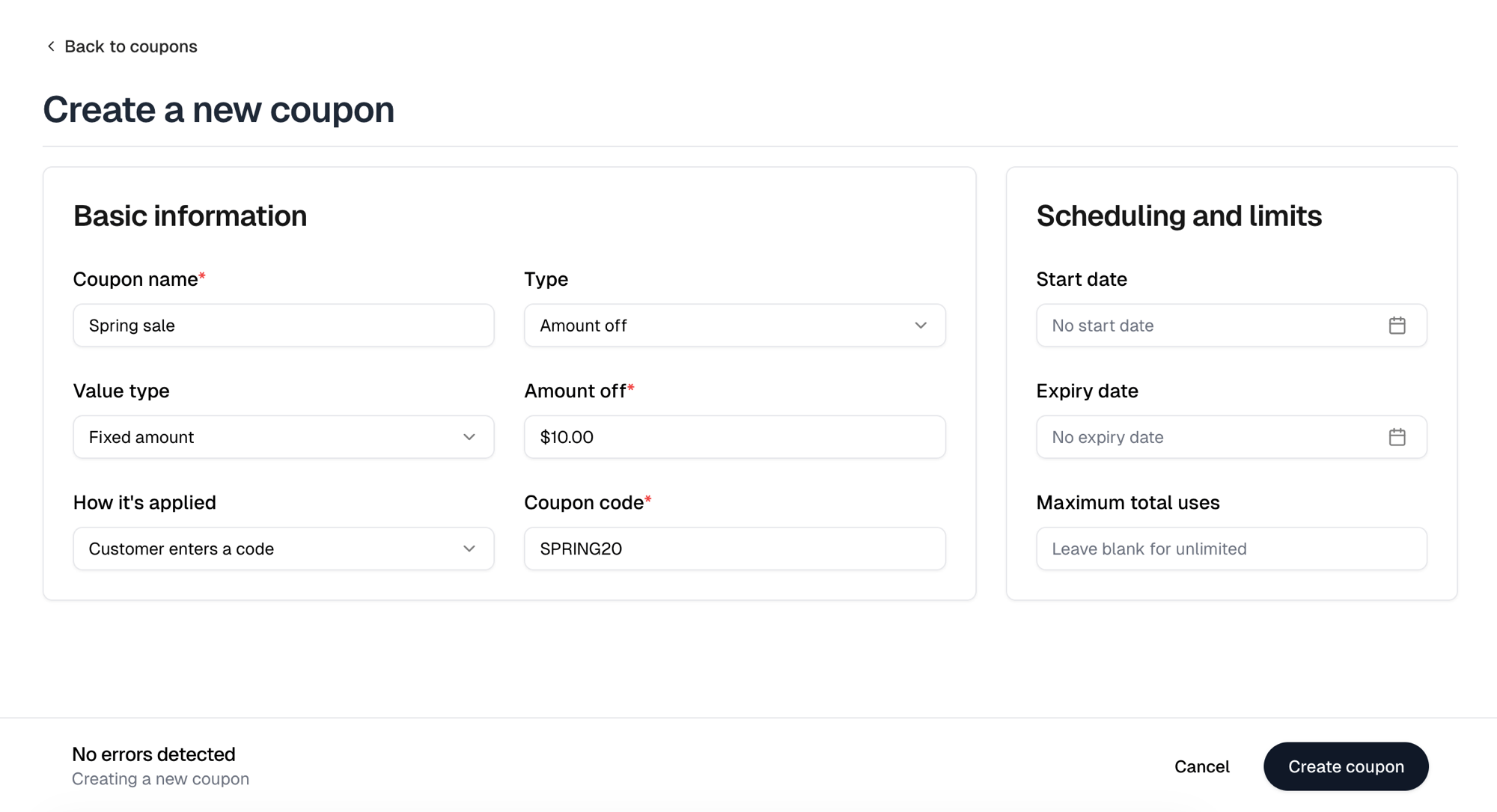
The form asks one question at a time. Each field appears once you have answered
the one before it, so most of the form is not on screen when you start. An
existing coupon opens with every field already showing.
Start with a **Coupon name**, then a **Type**.
| Type | Effect |
| ------------- | --------------------------- |
| Amount off | Reduces the order total |
| Free shipping | Removes the shipping charge |
**Amount off** then asks for a **Value type**, either **Percentage** or **Fixed
amount**. **Percentage** takes a whole number from 1 to 100 under **Percent
off**, and **Fixed amount** takes a currency amount under **Amount off**.
## How customers get it
**How it's applied** offers two:
| Mode | Behavior |
| ---------------------- | ---------------------------------------------- |
| Customer enters a code | They type the code at checkout |
| Applies automatically | Applied without a code when its trigger is met |
A code coupon needs a **Coupon code**, such as `SPRING20`. Choose
**Applies automatically** for a sale where you do not want customers hunting for
a code.
 ## Triggers
A **Trigger** belongs to an automatic coupon, and it is required. There is no
automatic coupon that applies to every order, and a code coupon cannot carry one.
| Trigger | Requires |
| ------------------ | ------------------------------------------- |
| Minimum cart value | The order subtotal reaches an amount |
| Minimum item count | The order contains at least that many items |
Picking one adds the figure it needs, either **Minimum cart value** or
**Minimum item count**.
**Trigger** appears only after you choose **Applies automatically**, which is why
the form has no sign of it while **Customer enters a code** is selected.
Only one coupon applies to an order. When more than one automatic coupon
qualifies for a cart, checkout applies the best-value one. Creating a second
automatic coupon on a store asks you to confirm that first.
## Limits
**Start date** and **Expiry date** are both optional, so a coupon with neither
is live until you remove it. **Maximum total uses** caps redemptions across all
customers; leave it blank for unlimited.
## Advertising a new coupon
If the store's website header has no banner yet, creating a coupon offers to add
one promoting it. **Add banner** writes the banner, **Not now** leaves the header
alone. A header that already has a banner is never overwritten, and is not asked
about.
## The coupons list
The list opens on **Active** and **Inactive** holds the rest. Each row shows the
coupon's code or its automatic trigger, its value, a status badge, and how many
times it has been used against its cap. The chevron at the start of a row
expands it into the redemptions: date, order, customer, amount saved, order
total, and payment status.
| Badge | Meaning |
| --------- | ------------------------------------- |
| Active | Usable now |
| Scheduled | Its start date has not arrived |
| Expired | Past its expiry date |
| Maxed | It has reached **Maximum total uses** |
| Inactive | Deactivated by hand |
A row's menu offers **Edit**, **Deactivate** or **Activate**, and **Delete**.
Selecting rows reveals **Activate**, **Deactivate** and **Delete** for several at
once.
A coupon that has been redeemed cannot be deleted, because deleting it would
take its redemption history with it. Deactivate it instead. A bulk delete
silently skips the redeemed coupons in the selection.
## Triggers
A **Trigger** belongs to an automatic coupon, and it is required. There is no
automatic coupon that applies to every order, and a code coupon cannot carry one.
| Trigger | Requires |
| ------------------ | ------------------------------------------- |
| Minimum cart value | The order subtotal reaches an amount |
| Minimum item count | The order contains at least that many items |
Picking one adds the figure it needs, either **Minimum cart value** or
**Minimum item count**.
**Trigger** appears only after you choose **Applies automatically**, which is why
the form has no sign of it while **Customer enters a code** is selected.
Only one coupon applies to an order. When more than one automatic coupon
qualifies for a cart, checkout applies the best-value one. Creating a second
automatic coupon on a store asks you to confirm that first.
## Limits
**Start date** and **Expiry date** are both optional, so a coupon with neither
is live until you remove it. **Maximum total uses** caps redemptions across all
customers; leave it blank for unlimited.
## Advertising a new coupon
If the store's website header has no banner yet, creating a coupon offers to add
one promoting it. **Add banner** writes the banner, **Not now** leaves the header
alone. A header that already has a banner is never overwritten, and is not asked
about.
## The coupons list
The list opens on **Active** and **Inactive** holds the rest. Each row shows the
coupon's code or its automatic trigger, its value, a status badge, and how many
times it has been used against its cap. The chevron at the start of a row
expands it into the redemptions: date, order, customer, amount saved, order
total, and payment status.
| Badge | Meaning |
| --------- | ------------------------------------- |
| Active | Usable now |
| Scheduled | Its start date has not arrived |
| Expired | Past its expiry date |
| Maxed | It has reached **Maximum total uses** |
| Inactive | Deactivated by hand |
A row's menu offers **Edit**, **Deactivate** or **Activate**, and **Delete**.
Selecting rows reveals **Activate**, **Deactivate** and **Delete** for several at
once.
A coupon that has been redeemed cannot be deleted, because deleting it would
take its redemption history with it. Deactivate it instead. A bulk delete
silently skips the redeemed coupons in the selection.