> ## Documentation Index
> Fetch the complete documentation index at: https://itemstores.com/help/llms.txt
> Use this file to discover all available pages before exploring further.
# QuickBooks Online
> Post sales, fees and payouts into QuickBooks
Connecting QuickBooks lets you push your Itemstores activity into your books, so
you are not re-entering it.
## Connecting
**Connect** on the QuickBooks card in
[Integrations](/help/knowledge-base/settings/integrations) sends you to Intuit to
authorize the company. Only the owner and admins can connect it, and it requires
a Full or Enterprise license.
Two things about the company you pick are checked before anything is stored:
* It must be a US company. Other countries are refused.
* Its home currency must match your Stripe settlement currency.
Once connected, the card shows the date posting starts from. Money that settled
before that date never posts, because a business connecting QuickBooks with
existing history already has that revenue in its books from the bank feed.
Finish **Account mapping** before you expect anything to post. Until every
required account is mapped, the card is badged Setup incomplete and nothing can
be posted.
## Nothing posts on its own
Itemstores does not sync in the background. Every posting is something you
choose to do, order by order or in bulk, and it only ever flows from Itemstores
into QuickBooks. Nothing in QuickBooks changes anything in Itemstores.
New controls appear elsewhere in Itemstores once you connect:
| Where | What appears |
| ------------------------------------------------------------------------- | ----------------------------------------------------------------------------------------------------------------------------------------------- |
| [Orders](/help/knowledge-base/orders) | **Post to QuickBooks** on an order and on the bulk toolbar, a sync badge per order, a **Needs QBO sync** filter, and **Bill point redemptions** |
| [Payouts](/help/knowledge-base/payouts) and [Reports](/help/knowledge-base/reports) | **Post expenses**, which sends payout fees to QuickBooks |
None of that exists before you connect.
Posting the same order twice is safe. Each piece of an order is recorded when it
posts, so a repeat only sends what has not gone across yet.
## Account mapping
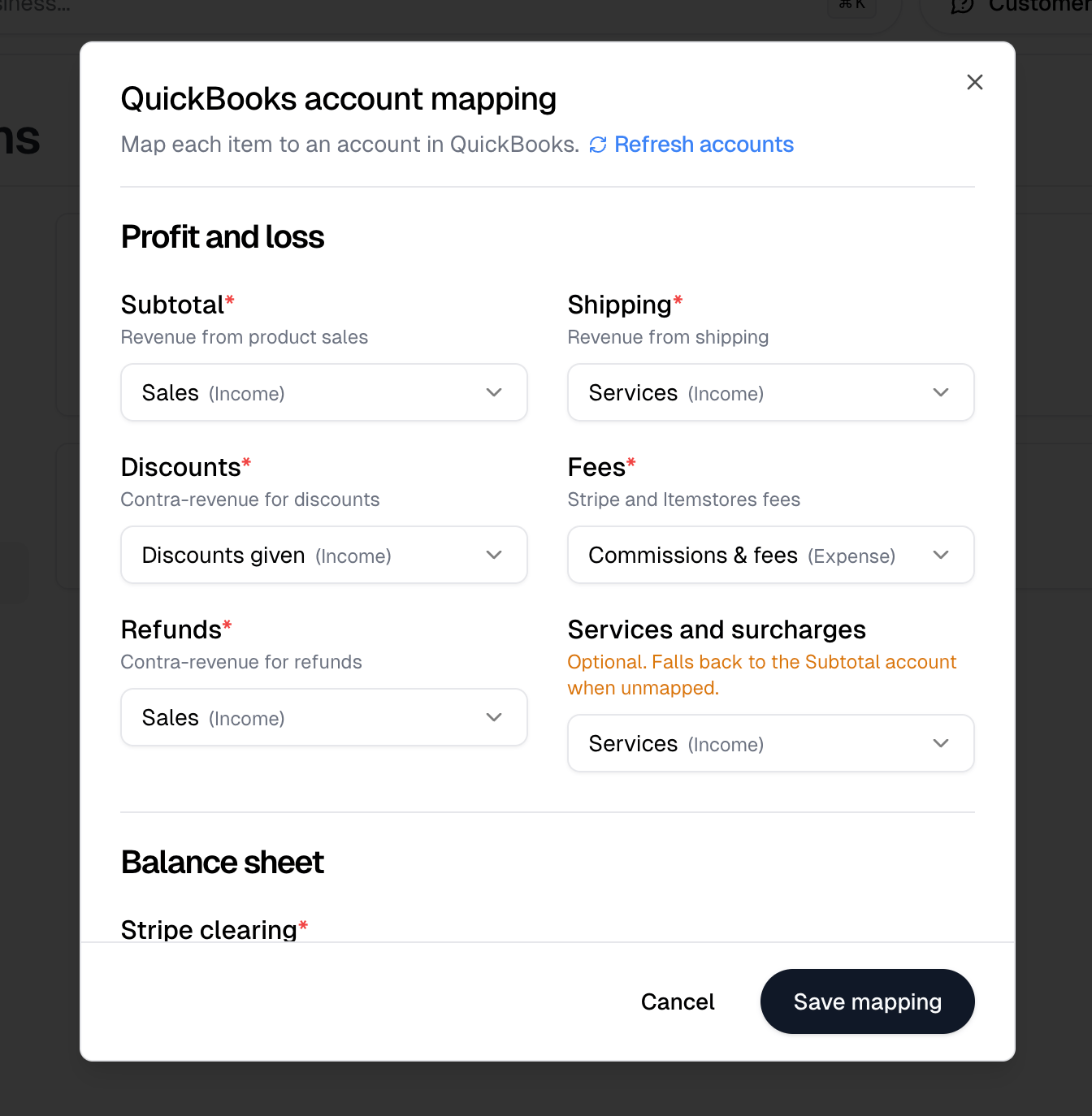
**Account mapping** tells Itemstores which QuickBooks account each kind of money
belongs in. **Refresh accounts** re-reads your chart of accounts if you have
just added one, and **Save mapping** stores your choices. For a required item
where you have no eligible account at all, Itemstores offers to create one.
### Profit and loss
Every item here is required except the last.
| Item | What it holds |
| ----------------------- | ---------------------------------------------------------- |
| Subtotal | Revenue from product sales |
| Shipping | Revenue from shipping |
| Discounts | Contra-revenue for discounts |
| Fees | Stripe and Itemstores fees |
| Refunds | Contra-revenue for refunds |
| Services and surcharges | Optional. Falls back to the Subtotal account when unmapped |
Changing an income account later does not move revenue that already posted, and
mostly does not affect future postings of existing products either. QuickBooks
keeps the account each product was created with, so a remap applies to products
created from then on. Discounts are the exception and follow the mapping right
away. To move existing revenue, edit the product in QuickBooks.
### Balance sheet
**Stripe clearing** is required. It holds Stripe money until a payout lands, so
funds in transit reconcile.
Create a Stripe Clearing bank account in QuickBooks for this. An Other Current
Asset account also works and keeps the float out of cash.
**Undeposited funds** is optional, and is for cash and check quote payments. A
cash or check payment is skipped rather than posted while it is unmapped.
 ## Disconnecting
**Disconnect** stops orders posting. Nothing already posted is removed. The
dialog asks you to tick an acknowledgement before the button becomes available,
because what happens next depends on which company you reconnect.
| You reconnect | What happens |
| ------------------- | -------------------------------------------------------------------------------- |
| The same company | Your account mapping and start date are kept, and it picks up where it left off |
| A different company | A new start date is set, and every order already posted counts as unposted again |
## Disconnecting
**Disconnect** stops orders posting. Nothing already posted is removed. The
dialog asks you to tick an acknowledgement before the button becomes available,
because what happens next depends on which company you reconnect.
| You reconnect | What happens |
| ------------------- | -------------------------------------------------------------------------------- |
| The same company | Your account mapping and start date are kept, and it picks up where it left off |
| A different company | A new start date is set, and every order already posted counts as unposted again |