> ## Documentation Index
> Fetch the complete documentation index at: https://itemstores.com/help/llms.txt
> Use this file to discover all available pages before exploring further.
# Billing
> Invoices, credits and payment methods
What you pay Itemstores, as opposed to what customers pay you. Two tabs:
**Invoices** and **Credits**.
Staff can see both tabs, but topping up, paying an invoice, changing payment
methods and the apply-credits setting are limited to the owner and admins.
## Invoices
**Upcoming invoice** is the current billing period's charges, with its line
count and the period it covers. **Past invoices** lists each one by invoice
number with its status, billing period, due date and amount, and selecting a row
expands its line items.
An invoice that is still open carries a **Pay invoice** button on its row, which
charges your default payment method. Its status reads Overdue once the due date
has passed.
**New payment method** adds a credit or debit card. Each saved method's menu
holds **Set default**, which is the one every charge uses, and **Delete**. The
payment methods card sits on both tabs.
## Credits
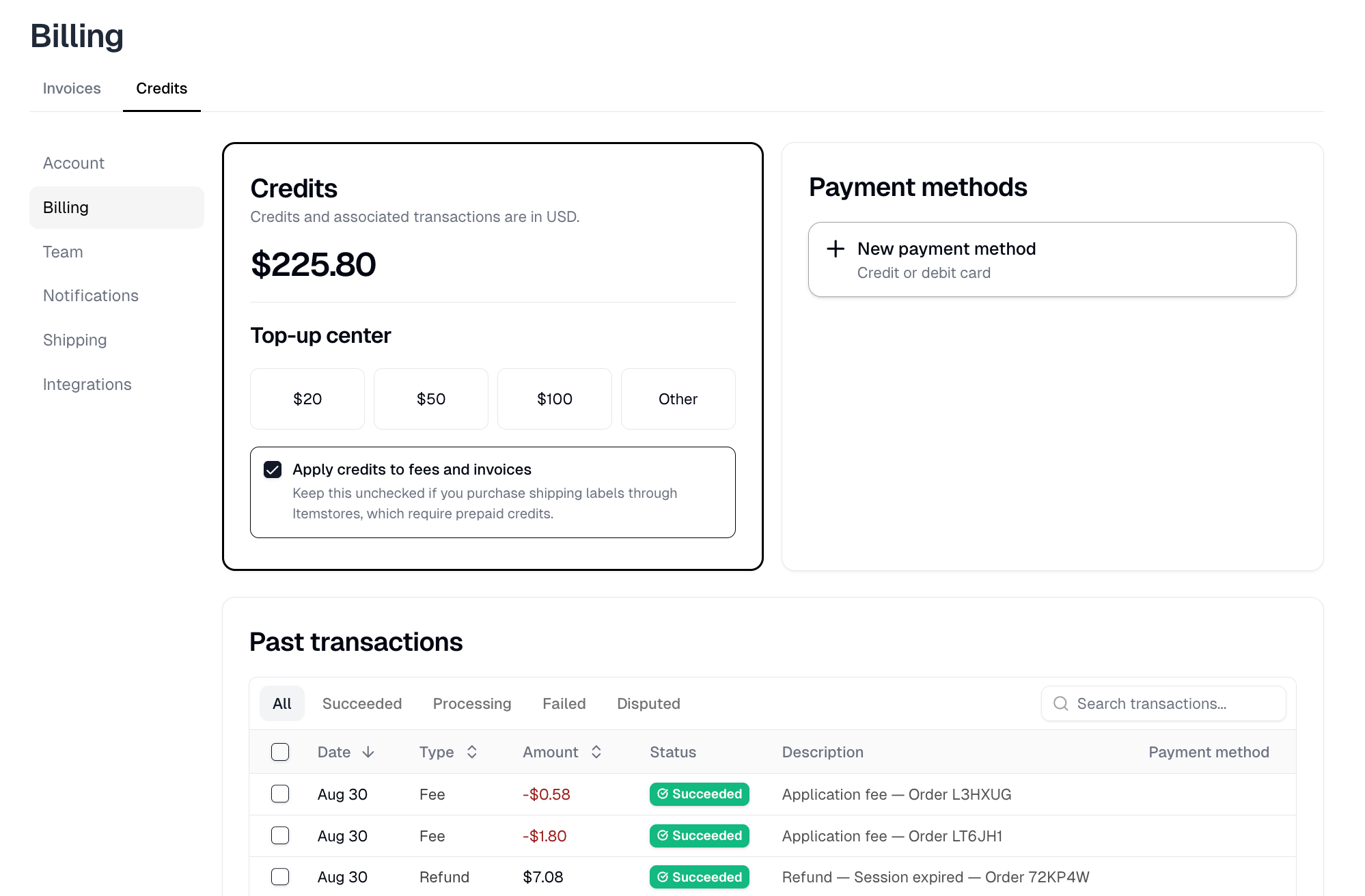
Credits are prepaid balance. Shipping labels bought through Itemstores are paid
for with them. Credits cannot be refunded or transferred.
**Top-up center** adds credit as \$20, \$50 or \$100, or select **Other** for
any amount from \$1.00. **Continue to payment** charges your default payment
method. Paying by bank account takes one to three business days to clear, and
the credit is added once your bank confirms it.
**Apply credits to fees and invoices** does what it says, and that is usually
not what you want. Leave it unchecked if you buy shipping labels through
Itemstores, because those need prepaid credit and this setting spends it on
your invoices instead.
 ## Past transactions
Every credit movement, searchable and filterable by **All**, **Succeeded**,
**Processing**, **Failed** or **Disputed**.
| Type | What it is |
| ---------------- | ------------------------------------------------------------ |
| Top up | Credit you bought, with the card used |
| Purchase | Credit spent, such as on a shipping label |
| Refund | Credit returned, such as from a voided label |
| Fee | Credit spent on a fee, such as an Itemstores transaction fee |
| Invoice | Credit spent on an Itemstores invoice |
| Referral reward | Credit earned from a referral |
| Adjustment | A manual correction |
| Chargeback | Credit taken back after a dispute |
| Dispute reversal | Credit reinstated after a dispute you won |
Invoice rows, and the transaction-fee rows under Fee, are what **Apply credits
to fees and invoices** produces. A voided shipping label appears here as a
refund against the purchase.
## Past transactions
Every credit movement, searchable and filterable by **All**, **Succeeded**,
**Processing**, **Failed** or **Disputed**.
| Type | What it is |
| ---------------- | ------------------------------------------------------------ |
| Top up | Credit you bought, with the card used |
| Purchase | Credit spent, such as on a shipping label |
| Refund | Credit returned, such as from a voided label |
| Fee | Credit spent on a fee, such as an Itemstores transaction fee |
| Invoice | Credit spent on an Itemstores invoice |
| Referral reward | Credit earned from a referral |
| Adjustment | A manual correction |
| Chargeback | Credit taken back after a dispute |
| Dispute reversal | Credit reinstated after a dispute you won |
Invoice rows, and the transaction-fee rows under Fee, are what **Apply credits
to fees and invoices** produces. A voided shipping label appears here as a
refund against the purchase.