> ## Documentation Index
> Fetch the complete documentation index at: https://itemstores.com/help/llms.txt
> Use this file to discover all available pages before exploring further.
# Print on demand
> Blanks that Fulfill Engine prints and ships for you
Print on demand is the [Fulfill Engine](/help/knowledge-base/settings/integrations/fulfill-engine)
catalog. Import a style here and Fulfill Engine prints and ships it, instead of
you buying stock and decorating it yourself.
Browsing is open to everyone. Importing needs a connected Fulfill Engine account,
and connecting one requires a Full or Enterprise license.
## Finding a product
Filter by **Provider**, **Brand** or **Printing method**. The printing method
filter is the useful one: it narrows to products that can be produced the way
you intend, whether that is DTG, DTF, embroidery, dye sublimation, engraving,
HTV, screen print transfer, sewn on patch or UV.
Each card shows its Fulfill Engine product ID, brand, price range, available
colors and size range.
## Importing one
Open a product to see its available printing methods, all its colors and sizes,
and the full specification.
Choose the colors you want, or **Select all**. Sizes start out all selected, so
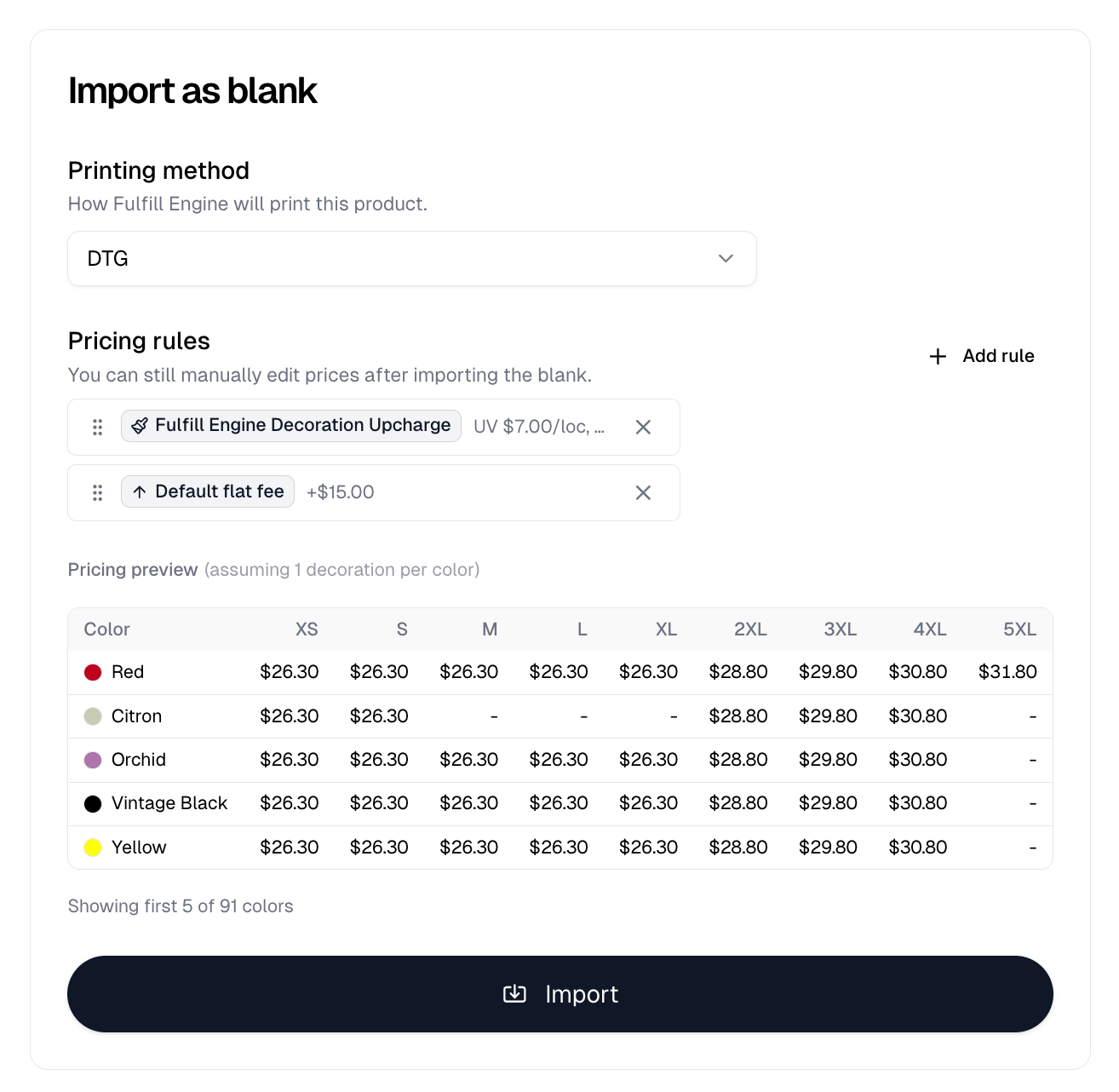
deselect any you do not want. Then **Import as blank** opens the import form.
**Import as blank** only opens that form once your
[Fulfill Engine](/help/knowledge-base/settings/integrations/fulfill-engine) account is
connected. Without it you get a Fulfill Engine integration required dialog
instead.
| Option | What it does |
| --------------- | --------------------------------------------------------------------------------------------- |
| Printing method | How Fulfill Engine will print this product. Lists the methods this product is eligible for |
| Pricing rules | Applies [rules](/help/knowledge-base/pricing-rules) as it imports. Prices stay editable afterwards |
Pick a pricing rule and a **Pricing preview** appears below it, showing the
resulting price for your selected sizes across the first 5 of your selected
colors. It names the assumptions it priced on, such as one decoration per color
or one embroidery location at 8,000 stitches, and a dash means that color does
not come in that size. Where a rule has quantity breakpoints, you get one grid
per tier.
**Import** then imports it.
 Every variant has to price at least 10% above what Fulfill Engine charges you.
Itemstores refuses the import otherwise, naming the color and size and telling
you to add a pricing rule to mark prices up. With no pricing rule attached, the
price is the cost, so a first import usually needs one.
## After importing
You get a [blank](/help/knowledge-base/blanks) badged **Fulfill Engine**, which you decorate
like any other.
The Fulfill Engine decoration method is locked after import. Choose it correctly
at import time, because changing it afterwards means importing the product
again.
Every variant has to price at least 10% above what Fulfill Engine charges you.
Itemstores refuses the import otherwise, naming the color and size and telling
you to add a pricing rule to mark prices up. With no pricing rule attached, the
price is the cost, so a first import usually needs one.
## After importing
You get a [blank](/help/knowledge-base/blanks) badged **Fulfill Engine**, which you decorate
like any other.
The Fulfill Engine decoration method is locked after import. Choose it correctly
at import time, because changing it afterwards means importing the product
again.