> ## Documentation Index
> Fetch the complete documentation index at: https://itemstores.com/help/llms.txt
> Use this file to discover all available pages before exploring further.
# Blanks
> Undecorated garments ready to decorate
A blank is an undecorated garment you can put artwork on. Blanks are what
[products](/help/knowledge-base/products) are built from.
## Adding a blank
**New blank** offers two routes:
| Route | Use it for |
| ------------------- | -------------------------------------------------------------------- |
| Import from catalog | Picking a blank from the supplier [catalog](/help/knowledge-base/catalog) |
| Create custom | Defining your own blank from scratch |
Filter the list by category, brand, supplier or decoration method, and use
**View archived blanks** for ones you have archived.
Select blanks to reveal a toolbar with **Edit**, **Download CSV** and
**Actions**, which archives, restores or deletes them.
## Editing a blank
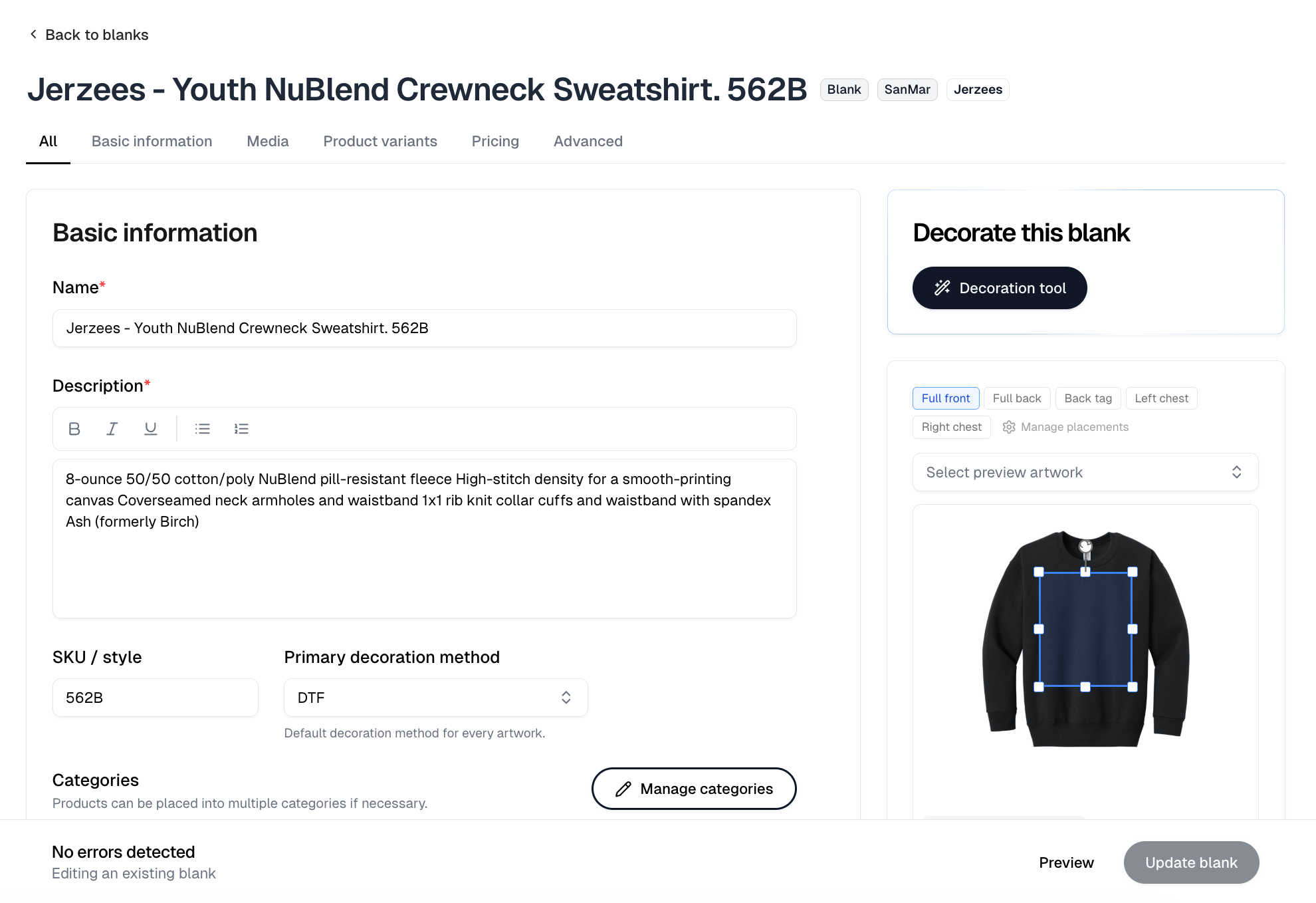
A blank opens on the same tabs as a product: **All**, **Basic information**,
**Media**, **Product variants**, **Pricing** and **Advanced**.
The panels on the right are what make it a blank rather than a product.
**Decorate this blank** holds the **Decoration tool** button. It is unavailable
on a blank whose supplier has discontinued the style.
Below it sits the placement editor. Pick a placement and drag the box on the
garment to move or resize where decoration lands. It is not just a preview: your
changes save with the blank, and because they are stored against the supplier
style, every blank and product you build from that style inherits them.
**Select preview artwork** puts a design on the garment so you can judge the box
against real artwork. It changes nothing on its own. **Apply**, beside it, takes
you to that artwork's [Apply to products](/help/knowledge-base/artwork/apply) for this
blank.
 ## Placements
The placement list is where artwork can go, and what it offers depends on the
garment and on which views the blank has images for. A tee offers full front,
full back, back tag, left and right chest and the sleeves. Caps, beanies, bags
and bottoms have their own. Most placements have both a flat and an on-model
version, so you can preview a design as it will photograph.
The link above the garment edits that list. It reads **Manage placements** while
the view you are on already has placements, and **Add placement** when it has
none.
## Decorating a blank
**Decoration tool** places artwork on a blank and creates the products from it.
See [Decoration tool](/help/knowledge-base/blanks/decorate).
## Collections
The **Collections** tab groups blanks you use together, so you can pull in a
whole set rather than picking each one.
## Placements
The placement list is where artwork can go, and what it offers depends on the
garment and on which views the blank has images for. A tee offers full front,
full back, back tag, left and right chest and the sleeves. Caps, beanies, bags
and bottoms have their own. Most placements have both a flat and an on-model
version, so you can preview a design as it will photograph.
The link above the garment edits that list. It reads **Manage placements** while
the view you are on already has placements, and **Add placement** when it has
none.
## Decorating a blank
**Decoration tool** places artwork on a blank and creates the products from it.
See [Decoration tool](/help/knowledge-base/blanks/decorate).
## Collections
The **Collections** tab groups blanks you use together, so you can pull in a
whole set rather than picking each one.